
Why Is My Wi-Fi So Slow in One Room? A UK Fix-It Guide
One room that drops calls, buffers Netflix and refuses to load a webpage whilst the rest of the house flies along — here's how to diagnose the dead zone and choose the right fix.

That one stubborn room — the loft office, the garden room, the back bedroom — is almost always solvable once you know what's causing it.
If you've ever sat in one particular room, watched a video call freeze, glanced at your phone showing a single bar of Wi-Fi and thought "but it's perfect downstairs," you're not alone. The single-room dead zone is the most common broadband complaint I hear, and the good news is that it's almost always fixable without ripping up floorboards or paying for an engineer's call-out.
The slightly less convenient news is that there's no single magic gadget that suits every home. A solid stone Victorian terrace behaves completely differently to a modern timber-frame new build, and a loft conversion three floors up has different needs to a kitchen extension twenty feet from the router. So rather than throw one product at you and call it a day, this guide walks through the three categories that actually solve dead zones — Wi-Fi range extenders, mesh systems and powerline adapters — and tells you honestly which one suits your situation.
 By Ryan Jones · Software & Guides Editor · Updated June 03, 2026
What this guide covers
- Why one room goes slow
- How to diagnose your dead zone
- The three-way decision matrix
- Best Wi-Fi range extenders
- Best mesh systems
- Best powerline adapters
- Head-to-head comparison
- Setup and placement tips
- Pros, cons and ratings
- FAQs and final verdict
Why does Wi-Fi go slow in just one room?
Wi-Fi is radio, and radio doesn't like obstacles. Every wall, floor, mirror, water tank and large metal appliance between your router and your device chips away at the signal. By the time it reaches that far-flung room, there may simply not be enough of it left to deliver decent speeds.
The usual culprits in UK homes are surprisingly predictable:
Thick or dense walls
Solid brick, stone, and old lath-and-plaster absorb signal aggressively. Two or three of these between router and room can be enough to kill speeds.
Distance and floors
Signal weakens with every metre, and travelling up through floors costs you more than travelling sideways. Loft offices are classic dead zones.
Interference
Microwaves, baby monitors, cordless phones and your neighbours' overlapping networks all crowd the 2.4 GHz band, which is exactly the band that travels furthest into your problem room.
Router in the wrong place
If your router lives in a cupboard by the front door — where the broadband line enters — it's broadcasting half its signal out into the street rather than into your home.
The key thing to understand is the difference between coverage and throughput. You might have a strong enough signal to show three bars in the room, but still get sluggish speeds because the connection between the router and whatever's boosting it is the real bottleneck. That distinction matters enormously when you choose your fix, and it's why the cheapest option isn't always the right one.
Diagnose your dead zone first
Before you spend a penny, spend ten minutes diagnosing. I do this in every home I help, and it saves people buying the wrong kit constantly.
1. Run a speed test in two places
Test next to the router, then in the dead zone. If you get, say, 200 Mbps by the router but 8 Mbps in the bedroom, you've confirmed a coverage problem rather than a slow line.
2. Check the signal strength
Most phones show Wi-Fi bars; free apps show actual signal in dBm. Anything weaker than around -70 dBm in the room tells you the signal is barely arriving.
3. Test the halfway point
Walk towards the router and watch where the speed recovers. That "recovery line" is roughly where an extender wants to live.
4. Note your sockets and wiring
Is there a mains socket in the dead zone? Is it on the same ring main as the router? This decides whether powerline is viable.
Pro Tip: try the free fix first
Before buying anything, try repositioning your router. Lift it off the floor, move it out of the cupboard, keep it away from the TV and the fish tank, and point any external aerials at a mix of vertical and horizontal angles. I've seen a poorly placed router go from useless to acceptable with nothing more than a five-minute relocation onto a shelf.
A quick speed test by the router and again in the problem room instantly tells you whether you've got a coverage issue or a slow line.
The three-way decision matrix
Once you know it's a coverage problem, the choice comes down to three approaches. Here's the honest breakdown of when each one wins.
| Approach | Best for | Strengths | Watch-outs |
|---|---|---|---|
| Single extender | One problem room near the router, same floor | Cheapest, fastest to install | Many models halve throughput; weak if placed too far from the router |
| Powerline | Thick walls, awkward layouts, rooms Wi-Fi won't reach | Wired-quality link without drilling; brilliant uplink for video calls | Performance varies with house wiring; avoid plugging into multi-plug adapters |
| Mesh system | Blanket, seamless coverage across a larger home | Gold standard; one network, seamless roaming | Most expensive option of the three |
To put it plainly: bringing reliable internet to a single awkward room — a loft office or a garden room — is often best solved by powerline, which strikes a lovely balance of simplicity, stability and price. A tiny dead zone where you just want the cheapest possible fix is extender territory, as long as you accept reduced speeds and slightly clunky roaming. And if you want the whole house blanketed and you don't mind paying for it, mesh is the answer.
Category A: best Wi-Fi range extenders
Extenders are the plug-in-and-go option. They grab your existing Wi-Fi and rebroadcast it further into the house. They're cheap and quick, but the cheaper ones rebroadcast on the same band they receive on, which can roughly halve the throughput. Here are the four I'd point people towards.
TP-Link RE300 — the budget pick
Check TP-Link RE300 price on Amazon UK
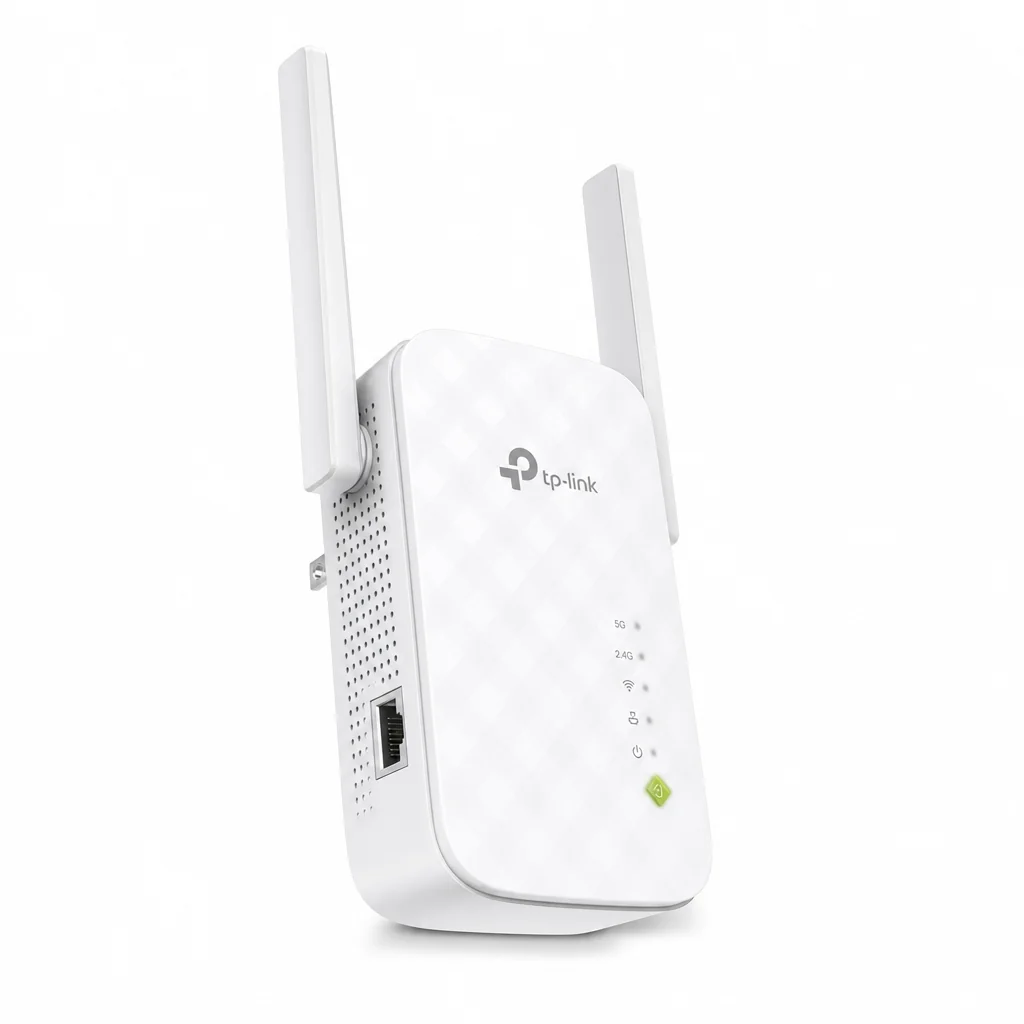
The RE300 is the classic entry-level extender, and Expert Reviews UK rates it as the best budget choice. It's a Wi-Fi 5 AC1200 dual-band unit delivering up to 867 Mbps on 5 GHz and 300 Mbps on 2.4 GHz. It's EasyMesh-compatible, has an Access Point mode, and you set it up through the TP-Link Tether app. The one thing to keep in mind is that its single Ethernet port is Fast Ethernet only — 100 Mbps — so it's not the one to choose if you want to hardwire a gaming PC or a fast NAS through it.
TP-Link RE505X — the mid-range Wi-Fi 6 sweet spot
Check TP-Link RE505X price on Amazon UK
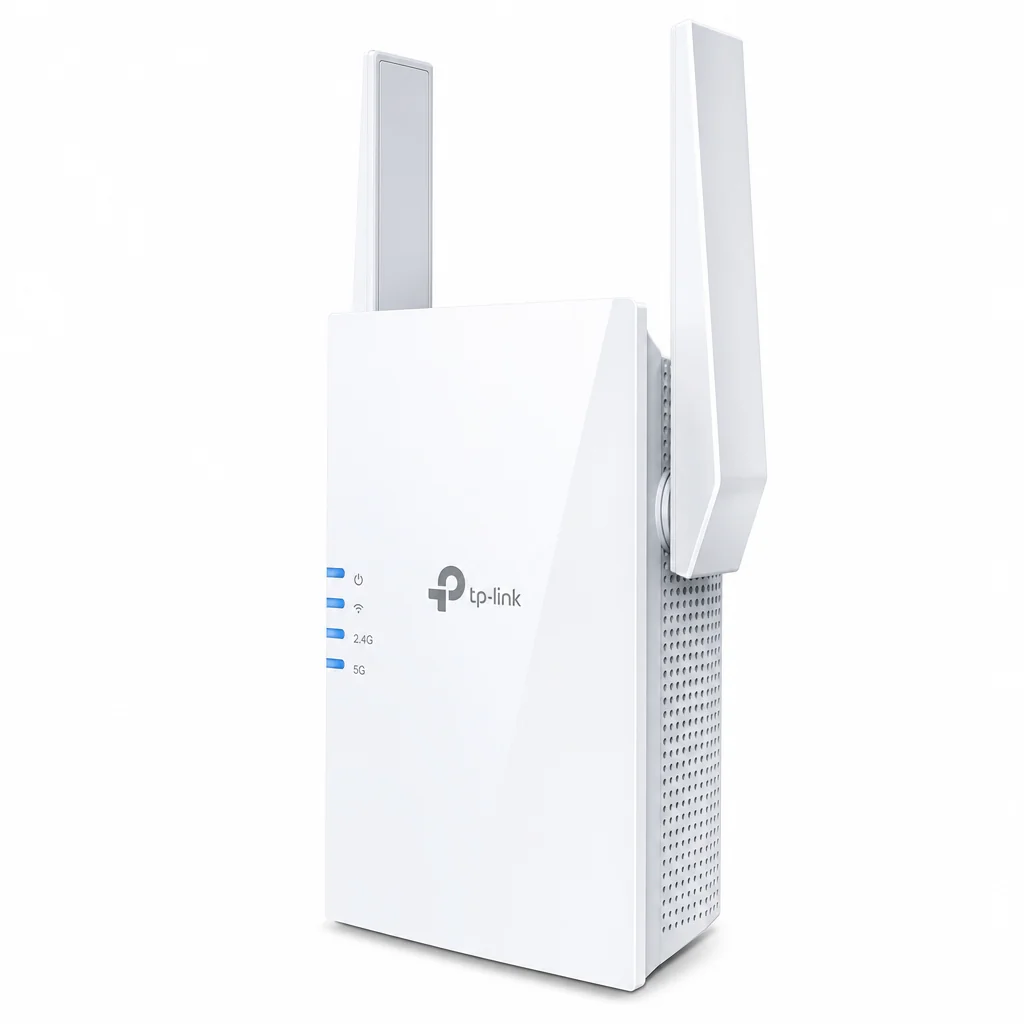
Step up to Wi-Fi 6 and the RE505X is the value choice. This AX1500 dual-band extender pushes 1,200 Mbps on 5 GHz and 300 Mbps on 2.4 GHz, and crucially it has a full Gigabit Ethernet port. It supports both OneMesh and EasyMesh plus AP mode and the Tether app. It's physically a bit bigger than most extenders — roughly twice as tall as a standard pack-of-cards unit, though similar in width — so it'll stick out from a low socket.
TP-Link RE705X — the step-up performer
Check TP-Link RE705X price on Amazon UK
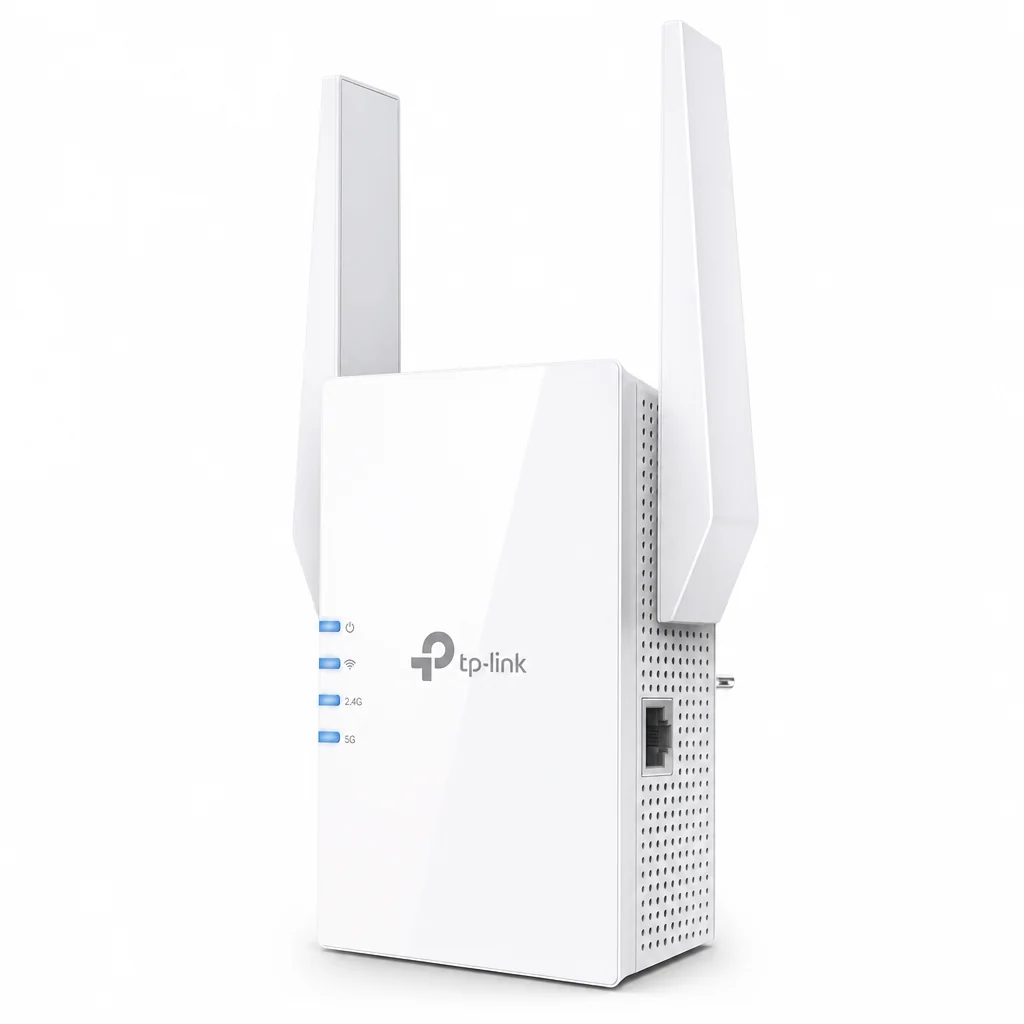
If you want headroom, the RE705X is an AX3000 Wi-Fi 6 extender rated at 2,402 Mbps on 5 GHz and 574 Mbps on 2.4 GHz. It packs four high-performance amplifiers and uses Adaptive Path Selection to automatically pick the fastest connection route back to the router. You also get OneMesh and EasyMesh, AP mode, OFDMA, 2×2 MU-MIMO and support for 160 MHz channels — a proper feature set for a single extender. A Gigabit Ethernet port rounds it out.
Netgear Nighthawk EX7700 — the premium extender
Check Netgear Nighthawk EX7700 price on Amazon UK
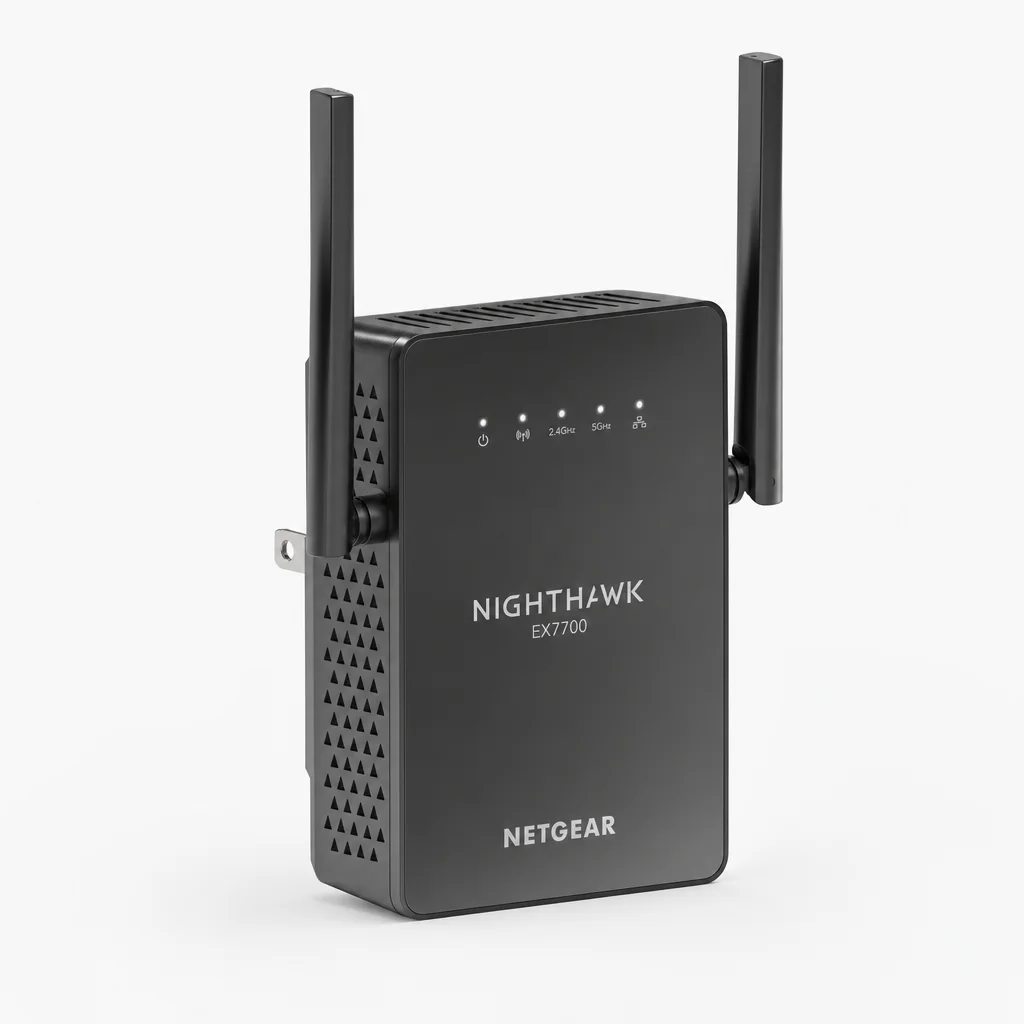
The Nighthawk EX7700 takes a smarter approach to the halving problem. It's a tri-band AC2200 unit with speeds up to 2.2 Gbps, and the trick is its dedicated 866 Mbps 5 GHz band reserved purely for talking to your router. Because that backhaul has its own channel, your devices don't lose half their speed the way they do on many cheaper extenders. It uses Netgear's FastLane technology, is mesh-compatible, and sets up through the Nighthawk app.
The single biggest mistake with extenders is placing them in the dead zone. Plug it in roughly halfway between the router and the problem room. If the extender only receives a weak signal, it can only rebroadcast a weak signal — boosting nothing.
A plug-in extender placed at the halfway point is the quickest, cheapest way to revive a single nearby room.
Category B: best mesh systems
Mesh is the premium answer. Instead of one router shouting into the distance, you scatter several nodes around the house that work together as a single network with one name. You walk from room to room and your phone hands over seamlessly — no manual reconnecting, no half-speed dead zones. It's the gold standard for blanketing a larger home, and the price reflects that.
Mercusys Halo H80X — the value champion
Check Mercusys Halo H80X price on Amazon UK
Mercusys is TP-Link's budget sub-brand, and the Halo H80X is the best-value Wi-Fi 6 mesh I'd recommend. It's an AX3000 dual-band system, and a two-pack is rated to cover homes up to 460 m², with a three-pack reaching up to 650 m² — plenty for most UK houses. Each compact unit has a 128 × 81 mm footprint and carries three Gigabit Ethernet ports at the rear, so you can wire in devices or use a wired backhaul. It supports 160 MHz channels and 2×2 MU-MIMO, plus beamforming, seamless roaming, client prioritisation, and genuinely useful parental controls including time limits and website-category filtering, all managed from the mobile app.
TP-Link Deco XE75 — the mid-range Wi-Fi 6E option
Check TP-Link Deco XE75 price on Amazon UK

The Deco XE75 brings Wi-Fi 6E and that all-important third 6 GHz band into play. It's a tri-band AXE5400 system delivering up to 574 Mbit/s on 2.4 GHz and up to 2,402 Mbit/s on both the 5 GHz and 6 GHz bands. A two-node setup covers around 510 m². That extra 6 GHz band is the headline feature: it's far less congested than the older bands, which makes it ideal for a dedicated, interference-free link between nodes — exactly what you want feeding a stubborn dead zone.
TP-Link Deco XE75 Pro — for multi-gig connections
Check TP-Link Deco XE75 Pro price on Amazon UK
The Pro version is the XE75 with the connectivity upgraded for faster broadband. The key addition is a 2.5 Gbps port, which matters if you've signed up to one of the new multi-gig full-fibre packages and don't want your mesh to be the bottleneck. If your line is under a gigabit, the standard XE75 is the sensible buy; if you're on multi-gig fibre, the Pro is the one that won't hold you back.
Netgear Orbi RBKE963 — the enthusiast's choice
Check Netgear Orbi RBKE963 price on Amazon UK
At the very top sits the Orbi RBKE963, a quad-band Wi-Fi 6E mesh aimed squarely at enthusiasts and large homes with demanding requirements. The extra band is dedicated to backhaul between nodes, so the system maintains its speed across the whole property rather than thinning out as you add nodes. It's overkill for a single dead zone, but if you're kitting out a big house end to end and want the best, this is the flagship.
Pro Tip: wire your nodes if you can
Mesh works wirelessly out of the box, but if you can run a single Ethernet cable to one node — using those Gigabit ports on the back — you get a "wired backhaul". This dedicates all of the wireless capacity to your devices rather than to node-to-node chatter, and it's the single best way to squeeze maximum performance from any mesh kit.
Mesh nodes work as a single, seamless network — ideal for blanketing a larger home rather than patching a single room.
Category C: best powerline adapters
Powerline is my secret weapon for the truly awkward room — the loft three floors up, the garden room across the patio, the back study behind two solid walls. It uses your home's existing electrical wiring to carry the network signal. You plug one adapter in near the router and connect it by Ethernet, then plug the second adapter into a socket in the dead zone. The data travels through the mains. No drilling, no trailing cables through the house.
TP-Link TL-PA9020P KIT — rock-solid wired stability
Check TP-Link TL-PA9020P KIT price on Amazon UK
If you want the most stable wired connection to a hard-to-reach room, the TL-PA9020P kit is the one. It's an AV2000 powerline kit with two Gigabit Ethernet ports per adapter, so you can hardwire two devices at the far end — say a desktop and a games console — and it keeps a pass-through socket so you don't lose the wall plug. For video calls in a tricky room, a wired powerline uplink is far more reliable than any boosted Wi-Fi.
TP-Link PGW2440 KIT — the future-proof hybrid
Check TP-Link PGW2440 KIT price on Amazon UK
The PGW2440 moves to the next-generation G.hn2400 powerline standard and adds AX1800 Wi-Fi 6 at the far end. So you get the wired-quality powerline backbone plus a fresh Wi-Fi 6 hotspot right there in the room — perfect if the dead zone needs to serve phones and laptops, not just a wired PC. The newer G.hn protocol makes this the most future-proof powerline kit here.
Devolo Magic 2 Wi-Fi 6 — the fastest hybrid tested
Devolo's Magic 2 Wi-Fi 6 also pairs G.hn powerline with Wi-Fi 6, and it's the fastest hybrid powerline I've tested. It's the premium pick in this category for anyone who wants powerline reliability in the walls and modern Wi-Fi 6 coverage in the room, with the speed to match.
Powerline performance depends on your house wiring, so plug adapters directly into the wall, never into an extension lead or multi-plug adapter. Doing so can dramatically cut speeds. Older properties with mixed-age wiring may also see more variation than newer homes on a single ring main.
Head-to-head: which fix for which room?
Here's how the three approaches stack up against the criteria that actually matter when you're staring at a dead zone.
| Criteria | Range extender | Mesh system | Powerline |
|---|---|---|---|
| Best scenario | One nearby room | Whole larger home | Single awkward room |
| Install effort | Lowest — plug and go | Moderate — several nodes | Low — two adapters |
| Roaming | Can be clunky | Seamless | Depends on hybrid Wi-Fi |
| Connection stability | Wireless, variable | Strong | Wired-quality, very stable |
| Cost | Cheapest | Highest | Mid-range |
Honest pros and cons of each approach
Where they shine
- Extenders: cheapest and quickest fix; the RE705X even auto-selects the fastest path back to the router.
- Mesh: one seamless network, brilliant roaming, and 6E models like the Deco XE75 add a clean 6 GHz band.
- Powerline: wired-quality stability into rooms Wi-Fi simply won't reach, no drilling required.
Where they fall short
- Extenders: many halve throughput, and the budget RE300 only has a 100 Mbps port.
- Mesh: the most expensive of the three, and overkill for a single dead zone.
- Powerline: speed varies with house wiring, and you must avoid multi-plug adapters.
Powerline adapters route your network through the mains wiring — ideal for a loft office or garden room Wi-Fi struggles to reach.
Setup and placement that actually works
Whichever route you take, placement makes or breaks the result. A few field-tested rules:
Relative effectiveness illustrations based on placement best practice, not lab figures.
Use the app
TP-Link's Tether and Netgear's Nighthawk app both walk you through setup in a few taps, and the Tether app will tell you whether an extender is well or poorly positioned.
Mind the backhaul
On any mesh or extender, the link back to the router is the bottleneck. Wire it where you can, or lean on tri-band kit with a dedicated backhaul band like the EX7700 or Orbi RBKE963.
Keep it clear
Don't tuck nodes or extenders behind the sofa or inside a cabinet. Out in the open, off the floor, away from large metal objects.
Ratings: how the three approaches score
Who should buy what?
The budget fixer
One slow room near the router and you just want it sorted cheaply? Start with the TP-Link RE300, or the RE505X if you want Wi-Fi 6 and a Gigabit port.
The awkward-room owner
Loft office or garden room behind thick walls? Powerline wins. The TL-PA9020P for wired stability, or the PGW2440 / Devolo Magic 2 if you also want Wi-Fi 6 in the room.
The whole-home upgrader
Want seamless coverage everywhere? Mesh is it. The Mercusys Halo H80X for value, the Deco XE75 for 6E, or the Orbi RBKE963 for the absolute best.
Ready to buy?
Prices on networking kit shift constantly with bundles and pack sizes (two-node versus three-node mesh, single versus twin powerline kits). Check the latest price and any current bundles on Amazon before you commit.
Frequently asked questions
The verdict
There's no universal best buy here, because the right fix depends entirely on your home — and that's exactly why I've laid it out as a decision rather than a single recommendation.
If you've got one slow room near the router, an extender is the fast, cheap answer. The TP-Link RE300 is the budget hero, whilst the RE505X and RE705X bring Wi-Fi 6 and proper Gigabit ports if you want more headroom.
If your problem is an awkward, far-off room — a loft conversion or garden office behind thick walls — powerline is the unsung champion. The TP-Link TL-PA9020P delivers rock-solid wired stability, and the PGW2440 or Devolo Magic 2 Wi-Fi 6 add a fresh Wi-Fi 6 hotspot right where you need it.
And if you want to banish dead zones across a whole larger home, mesh is the gold standard. The Mercusys Halo H80X is the value pick, the TP-Link Deco XE75 adds a clean 6 GHz band, and the Netgear Orbi RBKE963 is the flagship for those who want the very best. Diagnose first, match the fix to the room, and that one stubborn dead zone becomes a thing of the past.
Match the fix to the room — extender, powerline or mesh — and you'll never lose a video call to that one slow corner again.